Lucky7even App and Mobile Casino for Australia
 Available in AU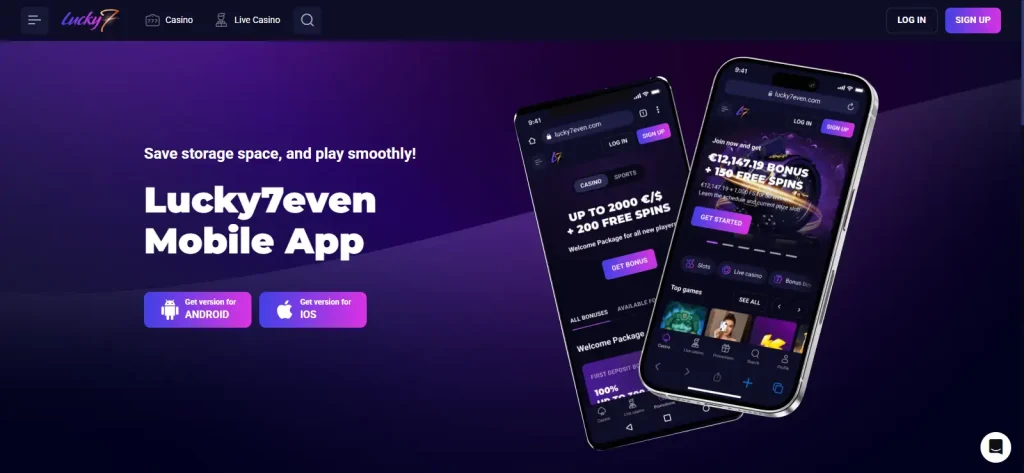
Mobile access check – updated 21 September 2026
Lucky7even documents an installable web app for both Android and iPhone on its current English-AU site. The official Android instructions start from the Lucky7even home page, use the browser menu and choose “Install App”. On iPhone, the operator tells users to open the site, tap “Share” and choose “Add to the Home Screen”. That is a browser-based installation flow, so this guide describes Lucky7even as an installable web app rather than a verified native Apple App Store or Google Play casino app. A home-screen icon can make access feel app-like, but it does not by itself prove native-store distribution. Australian readers should also keep mobile availability separate from regulatory status; the dedicated legal section covers that question.
Table of Contents
- What kind of Lucky7even app is documented?
- How the Android installation works
- How the iPhone installation works
- What stays browser-based after installation?
- Web app versus native app: a practical comparison
- How to check a future App Store or Google Play listing
- Mobile access does not answer the Australian legal question
- Mobile security checklist
- Bottom line on the Lucky7even app
- Sources checked for this mobile guide
What kind of Lucky7even app is documented?
The most useful distinction is between a native-store app and a web app installed from the browser. Lucky7even’s own AU installation page uses the wording “How to install web app on Android” and “How to install web app on iPhone”. On Android the process is initiated from the browser menu. On iPhone the process uses the standard Share menu and the Add to Home Screen command. Those are the signals that matter for classification.
This guide therefore uses “web app” or “installable mobile web app” as the precise description. You may also see the experience described informally as PWA-style because it can be placed on a home screen, but this review does not claim a specific technical PWA implementation, service-worker architecture or offline capability. Those details were not needed to answer the user question and were not independently audited.
The distinction matters because a native app usually has a store listing with a named developer, package or bundle identifier, store permissions, version history and distribution controlled by Apple or Google. A browser-installed web app instead starts from the website and creates a shortcut or installable web surface from that site. The visual result can look similar on a phone, but the distribution model is different.
How the Android installation works
The current official English-AU instructions describe a short three-step Android flow:
- Open the Lucky7even home page. Start from the operator’s own site in the mobile browser.
- Open the browser menu. The published guide tells the user to tap the three-dot menu and choose “Install App”.
- Confirm installation. The final step is to press the browser’s “Install” button.
This is important because the installation is initiated by the browser while the user is on the Lucky7even site. It is not the same process as downloading an APK from a third-party file host. For security and source authenticity, an Australian reader who chooses to use the mobile web app should start from the official site rather than searching for an unofficial APK with a similar brand name.
An installed shortcut can reduce the friction of typing or bookmarking the site each time, but it does not change the underlying editorial questions about the casino. Game availability, account rules, payment methods and regulatory context remain separate topics. For the current catalogue and provider restrictions, see the games on mobile guide.
How the iPhone installation works
The iPhone flow on the same official page also has three steps, but it uses Safari-style home-screen installation rather than an app-store download:
- Open Lucky7even on the iPhone. The instructions start from the Lucky7even home page.
- Tap Share. The operator tells users to use the Share control in the bottom navigation area.
- Add it to the Home Screen. Choose “Add to the Home Screen” and confirm with “Add”.
That flow creates home-screen access to the web experience. It should not be described as proof that Apple has reviewed or distributed a native Lucky7even casino binary. If a native listing appears in the future, the safer verification method is to reach it from a current official Lucky7even page and then check the store publisher details rather than relying on the app name alone.
This point is more than terminology. Search results can contain unrelated apps that use words such as Lucky, Seven or casino. A name resemblance does not establish that a store listing belongs to this operator. The official browser-install route gives a clearer chain back to the brand website.
What stays browser-based after installation?
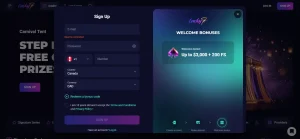
The official install page is part of the same English-AU website and exposes the normal Lucky7even navigation, including Casino, Live Casino, promotions, Help Center, support and profile controls. That supports a practical interpretation: installation gives a quicker route into the existing web product rather than creating a separate independently documented native product with a different feature set.
For a user, this means the important mobile questions are less about a store badge and more about whether the normal site functions are usable on the screen size and connection available. The install page itself confirms the browser-based install method, while individual game/provider availability can still vary. It would be inaccurate to promise that every title, payment route or account action behaves identically on every device.
The same separation applies to account functions. Registration, account access, support and identity checks are account-policy topics, not proof of a distinct native app. The registration and account guide covers those conditions and the support channels without treating mobile installation as a substitute for the Terms.
Web app versus native app: a practical comparison
| Question | What is currently documented | What should not be assumed |
|---|---|---|
| Android installation | Open the site, use the browser menu, choose Install App | A verified Google Play casino listing |
| iPhone installation | Open the site, use Share, choose Add to Home Screen | A verified Apple App Store casino listing |
| Distribution source | The Lucky7even website and browser installation flow | An unofficial APK or similarly named third-party app |
| Feature model | Access into the existing web experience | A separately documented native feature set |
| Australian status | An English-AU mobile page exists | Australian regulatory authorisation |
This comparison is deliberately conservative about taxonomy while still being direct about what the operator publishes. It avoids two common errors: calling every home-screen shortcut a native app, and treating the absence of a native-store claim as evidence that mobile access does not exist.
How to check a future App Store or Google Play listing
If Lucky7even later promotes a native app, do not verify it from the title alone. Start from the official brand site and look for a direct store link. Then compare the store publisher or developer name, privacy-policy destination and official website link with the operator information you already know. A mismatched publisher or an unrelated website is a reason not to describe the listing as official.
For Android, avoid treating an APK mirror as equivalent to Google Play distribution. An APK can be genuine or modified, and a search engine result is not a chain of custody. For iPhone, similarly named games can exist in the App Store without any relationship to Lucky7even Casino. The cleanest editorial standard is simple: native-store status should be claimed only when a current official or directly verified store listing establishes it.
The operator’s own installation instructions are the relevant reference point because a fabricated app interface could imply a native product that has not been verified.
Mobile access does not answer the Australian legal question
Lucky7even’s English-AU localisation and web-app installation flow are product facts. They do not establish Australian local licensing or legal authorisation. ACMA’s current guidance says the Interactive Gambling Act makes it illegal for gambling providers to offer certain online services to people in Australia, including online casinos. That regulatory issue is independent of whether a website loads on a phone, uses AUD wording or can be added to a home screen.
For that reason, this mobile guide does not use phrases such as “Australian approved app” or “licensed Australian casino app”. Readers who want the regulator-focused explanation should use the Australian legal context page, where licensing and enforcement evidence are handled separately from product features.
Mobile security checklist
- Start from the official site. Use the current Lucky7even address rather than an APK mirror, forum attachment or download directory.
- Check the address before installing. A home-screen shortcut should be created while you are on the intended Lucky7even web page, not a lookalike domain.
- Do not infer legitimacy from an icon. An attractive icon or store-like presentation does not establish who published the software.
- Keep account credentials private. Do not enter login details into third-party download pages or unofficial wrappers.
- Recheck the official instructions after major browser changes. Browser menu labels can change even if the underlying web-install concept remains the same.
These steps are source-verification habits, not a security certification of the casino. They simply reduce the risk of confusing the official browser route with unrelated software.
Bottom line on the Lucky7even app
For an Australian reader asking “Is there a Lucky7even app?”, the precise answer is yes in the sense that Lucky7even currently documents an installable web app for Android and iPhone. Android installation uses the browser’s Install App option, while iPhone installation uses Add to Home Screen. The verified evidence does not require calling that flow a native store app.
If your goal is quick access, the official web-install method is the documented route. If your goal is to know whether a native iOS or Android store package exists, require a current verified store listing before using that label. And if your question is whether the service is authorised in Australia, the app page cannot answer it – that belongs to the regulatory evidence.
For the full brand overview, return to the Lucky7even review.
Sources checked for this mobile guide
- Lucky7even English-AU Install App – current Android and iPhone web-app installation flow.
- ACMA Interactive Gambling Act guidance – current Australian regulatory context for online casino services.